What does a diagnostics lab app actually do?
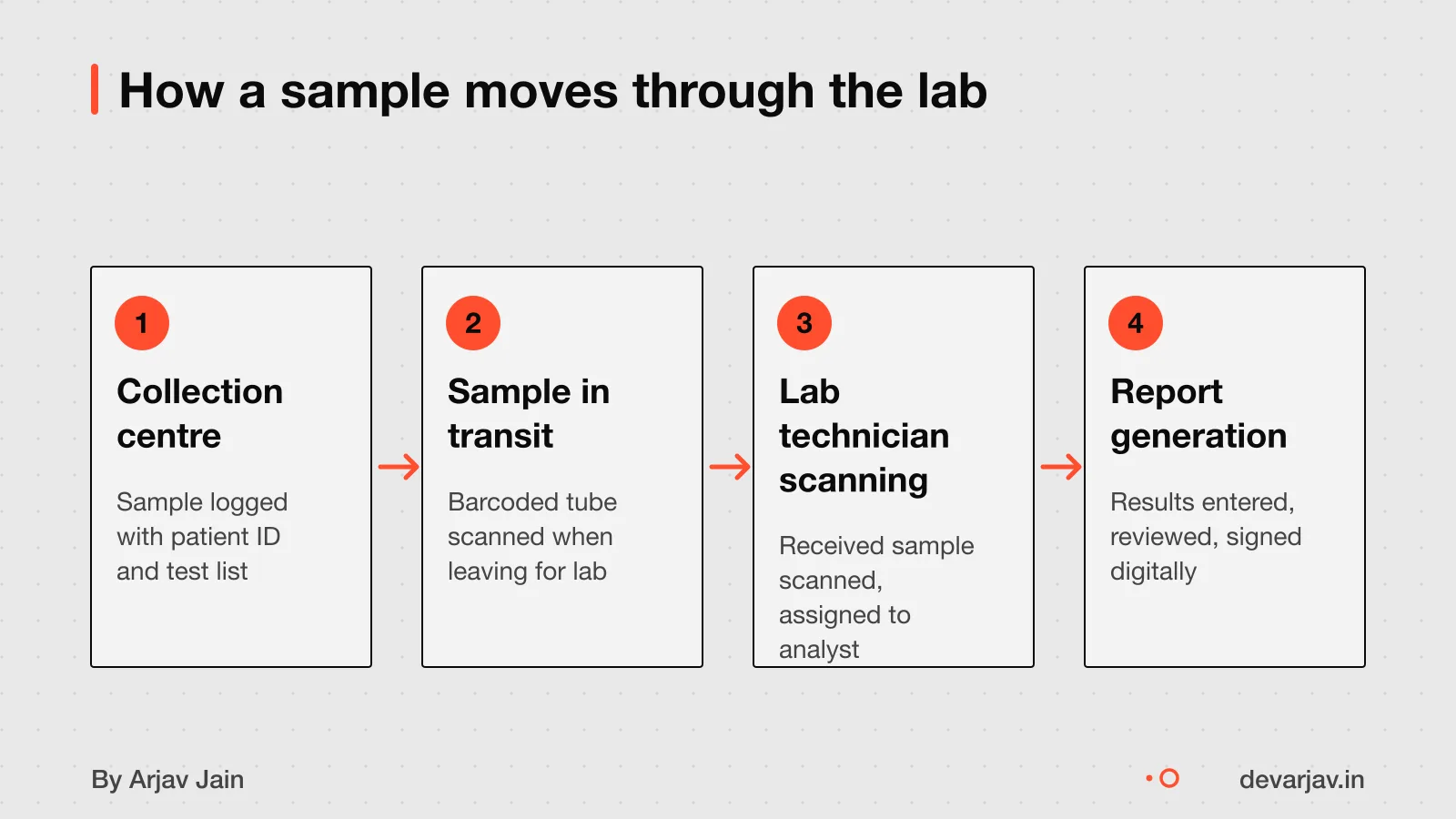
A diagnostics lab app manages every step of a sample’s journey, from collection to report delivery. Unlike a clinic app that focuses on patient visits and doctor notes, a lab app tracks samples, test progress and results with full traceability. For example, a Jaipur pathology lab handling 100 samples a day uses the app to log each sample’s location. Who handled it, and what tests are pending.
Key features include sample tracking, real-time status updates and digital report signing. The app records every action, like when a technician receives or tests a sample, with a timestamp and user ID, so nothing is missed. This real-time status tracking helps staff know exactly where each sample is, whether it’s waiting for QC or held for contamination checks.
Lineage tracking is also vital. The app maps how samples are related, for instance, if a blood draw is split into serum. Plasma, so you can trace results back to the original sample. To meet lab standards, the app must support digital signatures, version control and access rules for GLP and GxP compliance.
For full details on what features to include, see Must-have features for a diagnostics lab app.
How much does it cost to build a diagnostics lab app?
A diagnostics lab app costs ₹8 lakh to ₹22 lakh for a small collection centre. ₹35 lakh to ₹90 lakh for a mid-tier lab, and ₹1.8 crore to ₹8 crore for a full diagnostic centre. These figures cover the full lab setup cost. It does not specify included features. It also assumes secure data storage, role-based access, and basic teleconsultation support.
Ready-made software like Cloud Patholab costs ₹99 per month. This is cheaper upfront but may not support custom workflows or offline use. You trade control for lower cost and faster setup. For example, if you need integration with local hospitals or regional language support, custom development is better.
As an estimate, a mid-tier lab app with 10 user roles, 50 test types. PDF report delivery with SMS alerts would fall in the ₹35 to 90 lakh range. This assumes no major data migration and standard compliance needs. The final cost depends on how many third-party systems you connect to and whether you need offline functionality.
The cost does not include ongoing maintenance, cloud fees, or staff training. These can add 15% to 25% per year. Also, if your lab data is messy or spread across paper records, digitisation will take extra time and money.
Want a number for your lab idea? Send one line on WhatsApp. I reply with what drives the cost and what to cut.
Message me on WhatsApp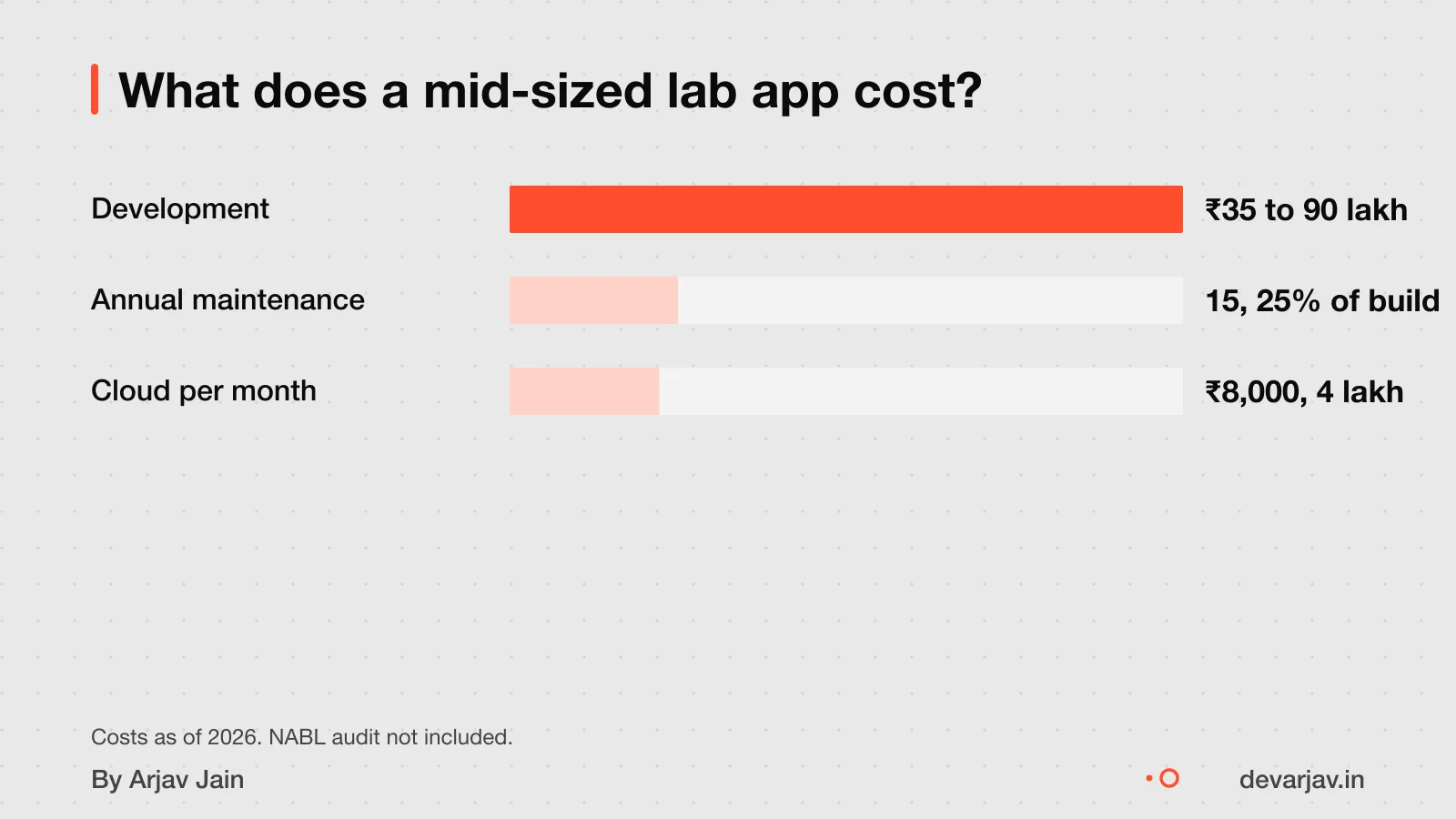
What features change the price the most?
Cross-platform apps using React Native or Flutter cost 30 to 40 per cent less than building three separate codebases. This is because one codebase runs on all platforms, cutting development time and effort. For example, a ₹10 lakh native-only app could cost ₹6 to ₹7 lakh if built cross-platform as an estimate, assuming equal features.
Adding data privacy compliance like HIPAA adds 20 to 30 per cent to total project costs. This includes secure data storage, audit logs, consent forms and breach protocols. Since your app will handle patient reports and personal details, this is not optional.
Integrations that add the most cost are payment gateways with GST invoicing, lab equipment APIs, and government health portals like ABDM. Each requires custom validation, error handling and uptime checks.
You may not know what features most affect price beyond platform choice. To get clarity, list your must-have reports, machines, and patient flows before asking for quotes.
How long does it take to build the app?
Building a diagnostics lab app depends heavily on data cleanup, not just coding. This includes time for planning, coding, testing, and deployment. The main delay is not coding but cleaning and organising your existing data, which can take weeks if records are incomplete or mixed.
Apple reviews 90% of apps in less than 48 hours. Google review times are not specified. As per Apple’s public data, 90% of apps are reviewed in less than 48 hours. This is rarely the bottleneck.
You can shorten the timeline by starting with a minimal version that handles only bookings, sample tracking, and report delivery. This core version can go live in 3 to 4 months. Adding advanced features like integration with lab machines or AI-based alerts comes later.
For a detailed breakdown of each step, see the Timeline for building a diagnostics lab app.
What tech stack is best for a diagnostics lab app?
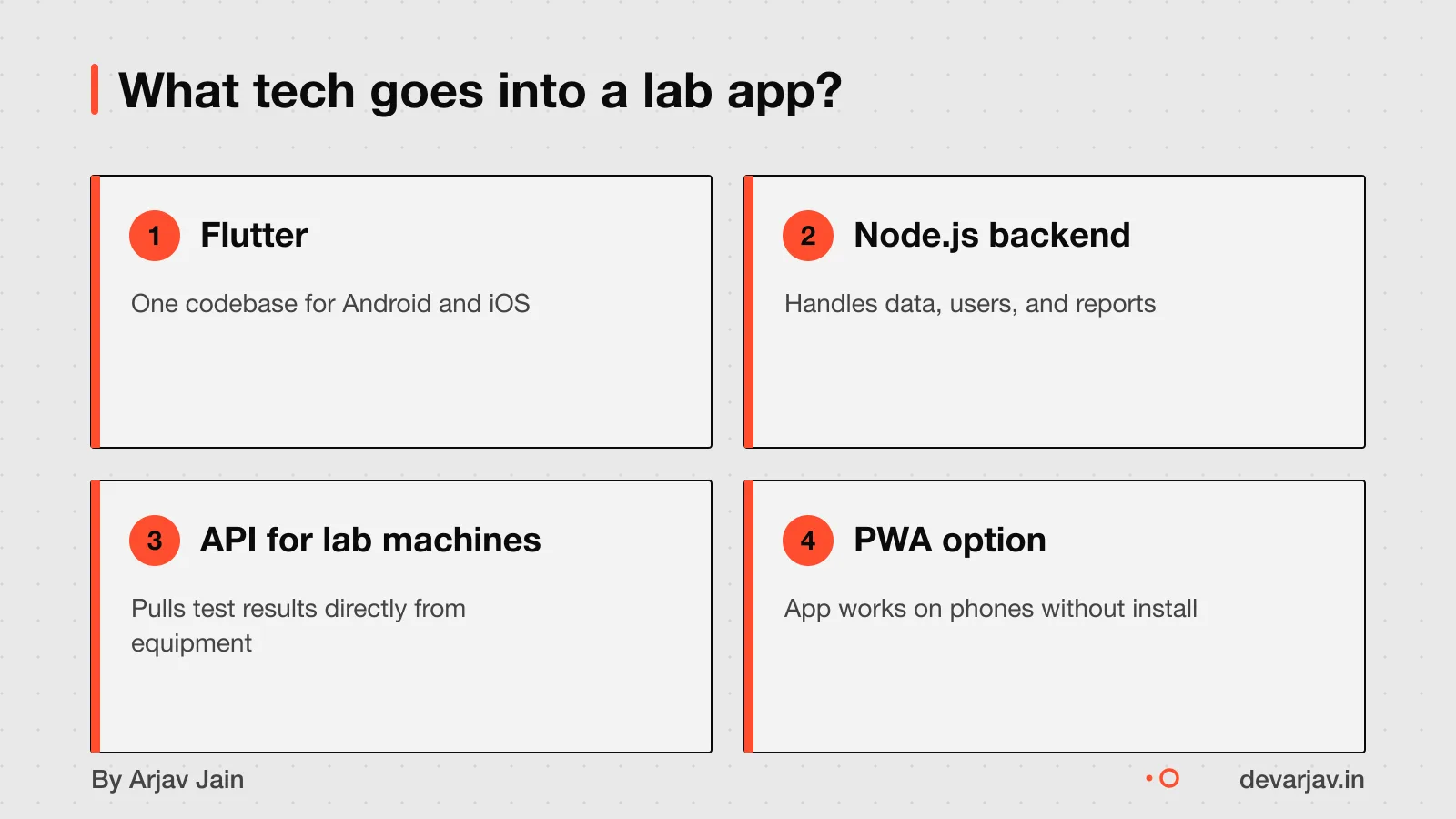
Use Flutter or React Native for the app and Node.js for the backend. This mix cuts cost by 30 to 40% compared to building separate iOS, Android, and web apps. Flutter and React Native let one codebase run on all devices, so you pay less and get faster delivery.
For your lab’s backend, Node.js handles data well and scales as your test volume grows. It works with databases that keep patient records safe and allows quick updates when test workflows change.
Avoid native code (Swift for iOS or Kotlin for Android) unless you need deep device features like advanced camera use. For most labs, the extra cost is not worth it.
Progressive Web Apps (PWAs) offer a native-like experience on phones and tablets. But they lack offline reliability and background sync, which labs need when internet is weak. So a PWA is not good enough for sample tracking or report delivery.
Compare your options here: Best tech stack for a diagnostics lab app.
What are the biggest risks in building the app?
Data breaches or non-compliance can lead to legal action and loss of trust. Over 275 million patient records were exposed in 2024 alone. If your app handles health data, even storing it without consent may break privacy rules. HIPAA penalties range from $100 to $50,000 per violation in the US. India does not yet have a central health data law, but courts may apply general privacy principles. Talk to a local lawyer before collecting any patient data.
App rejection often happens due to crashes or incomplete content. Over 40% of rejected apps fail on App Completeness guidelines, which cover crashes, placeholder text, and missing features. Apple and Google both reject apps that are not fully functional at review. Finalise all images, text, and flows before submission. Test every screen as if you were a lab technician with no tech help.
If the app crashes during use, patients may not get reports on time, and staff may lose work. Crashes during sample logging can cause mismatches between patients and tests. Use offline-first design so the app keeps working without internet. Test it on low-end phones used by field staff. Monitor crashes in real time with tools like Firebase Crashlytics.
Not sure if your project has this risk? Tell me the plan in two lines and I will say yes or no.
Message me on WhatsAppHow do I check if a developer has done this before?
Check if the developer has built apps that solve the same job, not just ones with similar names. Look for past work where the app handled sample tracking, report delivery, or patient data privacy in healthcare. A developer who has worked on hospital management systems, pharmacy apps, or telemedicine platforms may have relevant experience even. If they have not built a lab app before.
Use the `finding-similar-tools` open-source skill to search for apps by workflow, input/output, and user problem, not just keywords. This tool helps you find direct matches or practical substitutes across ecosystems. For example, an app that manages prescription refills may use similar verification and audit trails as a lab app.
Review their portfolio for evidence of data security, offline access, or integration with lab devices. Ask for a demo or screenshots of past healthcare projects. If they cannot show real examples, ask how they would handle a failed test result alert or a patient data leak. These responses reveal hands-on experience more than job titles or claims.
What legal rules apply to a diagnostics lab app in India?
Yes, the Digital Personal Data Protection Act, 2023 (DPDP) applies to your diagnostics lab app. You must protect patient data and report breaches. The Data Protection Board of India (DPBI) enforces this law as an independent authority. Appoint a data protection officer and document your data flows.
NABL accreditation is not a direct app rule, but your lab needs it to operate legally. The app must support NABL’s traceability and record-keeping rules. NABL fees range from ₹1.2 lakh to ₹4.5 lakh, with consulting costs of ₹3 lakh to ₹12 lakh. Prepare for 12 to 18 months before audit.
If you serve US patients, HIPAA compliance is legally required. As an estimate, assuming you handle protected health information, HIPAA adds 20 to 30% to your development cost. This covers audit logs, encryption, and third-party vendor agreements. Apple also requires healthcare apps handling sensitive data to be submitted by a legal entity, not an individual. Check with a legal advisor on which rules apply to your case.
When should you not build a diagnostics lab app?
When should you not build a diagnostics lab app?
If you run a small lab with fewer than 50 tests per day, off-the-shelf software may be enough. Ready-made tools like Thyrocare Lab Manager or Metropolis Connect already handle bookings, sample tracking and report delivery for basic workflows. Custom apps make sense when you have unique workflows, multiple collection centres, or need integration with existing hospital systems.
If you only need online booking or basic PDF reports, a simple website with a booking form.
Spending ₹8 lakh or more on a custom app only makes sense if it saves time, reduces errors, or grows patient volume. This is a general threshold for value. If you are not sure, start with a pilot using a ready-made tool.
Related reading: Cost to build a diagnostics lab booking app, Build or buy a diagnostics lab app?.
Next step: message me on WhatsApp with what you want to build. No forms, no sales team.
Message me on WhatsAppAssumptions behind the numbers
- Developer has past experience with lab systems like ELN
- Developer can prove past compliance with health data rules
- Developer hands over full code and account access
- Developer sets up a test environment during build
Your checklist
Before you hire, here are 12 things to check in the order they matter. Tick what you've verified.
Domain Fit
Compliance
Tech Scope
Terms
Walk away if
- Won't say who writes the code
- Quotes only a total with no scope
- Asks for the whole payment up front
- Keeps the store accounts or repository
- Promises a fixed date without seeing a scope
Questions people ask
What should I ask a developer before hiring them for a diagnostics lab app?
Ask if they have built apps with sample tracking, compliance for health data, and integration with lab machines. Check if they used APIs or pre-built add-ons for Electronic Lab Notebooks. Also ask for proof of past healthcare projects that handle patient reports or test workflows. This tells you if they understand lab workflows.
How do I verify a developer's experience with healthcare apps?
Look for direct matches like a past diagnostics app or practical substitutes such as telemedicine or clinic software. Check their portfolio on official sites or app stores to confirm claims. If they built a patient record system or handled test reports, that counts. Avoid vague case studies without proof.
Can the app work with my existing lab machines?
Yes, if your machines support API access or the app has pre-built add-ons for instrument connectivity. Ask the developer to show how they linked apps to lab devices before. Without API support, integration will need custom coding or may not work at all.
Is Flutter good for a diagnostics lab app?
Yes, Flutter can reduce development cost by 30 to 40 per cent by using one codebase for Android. IOS and web, compared to developing three codebases. It delivers near-native performance and is suitable for sample tracking and report viewing.
Do I need a legal entity to submit the app?
Yes, if your app handles medical data or connects to regulated hardware. It must be submitted by your clinic or lab as a legal entity. Apple and other stores require this for compliance. An individual developer cannot submit on your behalf in such cases.
What if the app needs to handle patient data across states?
The Digital Personal Data Protection Act allows data transfer within India, but you must get clear consent. Inform patients how their data will be used. Display a notice before they sign up. Check this for your case with a data protection officer or lawyer.
How can I reduce the cost of building a diagnostics lab app?
Use Flutter or React Native to save 30 to 40 per cent on development. Avoid adding HIPAA-like compliance unless you operate outside India or handle sensitive cross-border data, as it adds 20 to 30% to costs. Start with core features like sample tracking and reports.