What is a mobile app and how is it different from a website?
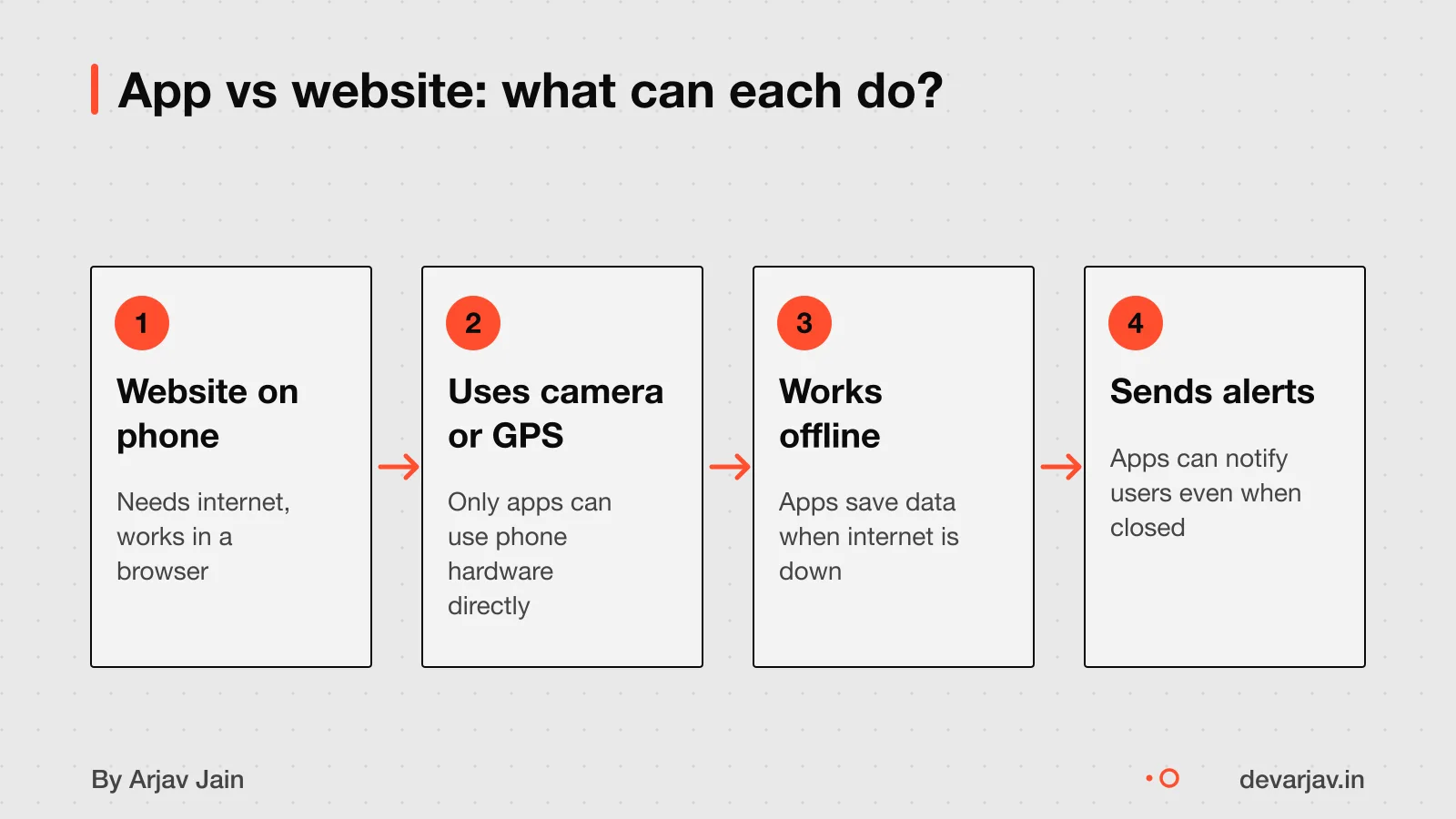
A mobile app is a program you install on your phone, like WhatsApp or Google Maps. It can do things a website cannot, such as send push notifications, work offline, use the camera, or track GPS location. For example, a clinic can use an app to remind patients of appointments with alerts, even if they do not open the app.
Websites are better for sharing information, like your shop’s address or price list. People find you on Google and read details on your website. But they book, order, track and pay using an app.
Think of a kirana store. You can list your products on a website, but an app lets staff scan items offline during power cuts. Send order confirmations via alerts, and track delivery boys using GPS.
An app stays signed in, so staff do not re-enter passwords each time. A website often asks again. If your work needs daily actions, not just updates, an app may help.
App or website: which should you build first?
When does your business really need an app?
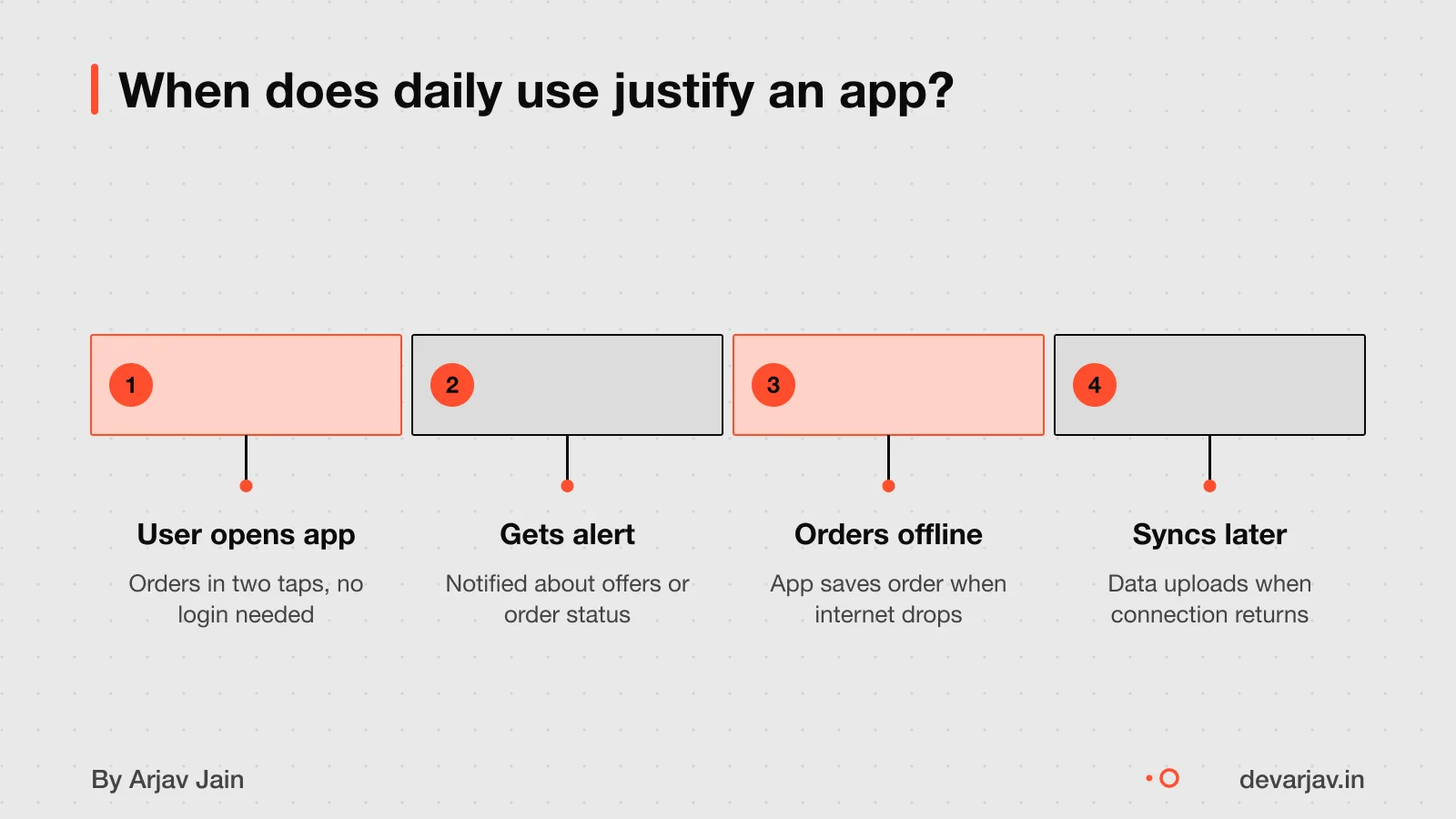
Your business needs an app only if customers or staff use it weekly and need offline access or phone features like GPS or camera. If people just check prices or send messages, a website or WhatsApp is enough. An app must earn its space on a phone.
For example, a clinic in Indore uses an app to let patients book slots and get vaccine reminders via push notifications. A school in Lucknow shares daily homework and exam schedules, even in low-signal areas. A food delivery team in Pune logs orders offline and syncs when back online. These apps solve real daily needs.
But a tailor in Jaipur who only shares catalog photos and takes orders over WhatsApp does not need an app. A local electrician or plumber can use a simple website for contact and pricing. A bakery posting daily specials on Instagram does not need one either.
A website or WhatsApp works well for one-off or monthly tasks. You save money and reach everyone. Apps make sense when the task repeats weekly and needs the phone’s full power.
Web apps and MVPs for when an app is too much can give you the core features without the full cost.
How much does a mobile app cost in India?
A mobile app in India typically costs ₹15 to 50 lakh to build. But you should plan for 3 to 5 times that over its lifetime. This total includes updates, hosting, bug fixes, and support. The initial quote rarely covers everything, and most projects go over budget due to added features.
Design costs add $5,000 to $30,000 (about ₹4 to 22 lakh at ₹80 per dollar), depending on screen count, animations, and team location. A clean, simple design with few screens costs less. Teams in major cities or Western countries charge more.
Adding features during development, called scope creep, raises costs by 20 to 40% on average. For example, if your quote is ₹20 lakh, unplanned changes could add ₹4 to 8 lakh. Start with a tight feature list and delay nice-to-have items.
Using Flutter can reduce costs by letting one codebase run on both Android and iOS. This cuts development time and effort. Native apps (built separately for each platform) take longer and cost more.
For a detailed breakdown of app costs in India, see What does it cost to build an app in India?. If your app must work offline, learn more at How much more does an offline-first app cost?.
Want a number for your idea? Send one line on WhatsApp. I reply with what drives the cost and what to cut.
Message me on WhatsAppFlutter vs native: which is better for your business?
Flutter lets you build one app that works on both Android and iOS from a single codebase. This means you pay for one team instead of two, cutting development costs. As an estimate, a cross-platform app can cost 30% less than two native apps. For most small businesses, this saving matters more than tiny speed differences.
Flutter apps run fast enough for daily tasks like forms, lists, and camera use. They feel like native apps to users. Google uses Flutter in its own apps, and big brands trust it. For business apps, like order tracking, staff checklists, or customer profiles, Flutter’s speed is strong enough.
But Flutter may not suit apps needing heavy graphics or deep phone integration. Games or AR apps often need native tools. Also, if your app must follow rare hardware rules or use very new phone features right at launch, native development gives more control.
For most small businesses in India, Flutter is the smarter start. It cuts cost and time without hurting function. You can always add native code later if needed.
Can your app work without internet?
Yes, your app can work without internet, but only if it is built that way from the start. This is called an offline-first app. It stores data on the phone so staff or customers can keep working during power cuts or poor signal.
Offline use is critical when your team must record sales, orders or visits in remote areas or during internet outages. For example, a field agent updating a client’s status from a village needs offline access.
It is built by saving data locally on the phone first, then syncing it to the cloud when the internet returns. My habit tracker app, Loopin, works this way: it saves your streaks on the device and syncs to Google Drive later.
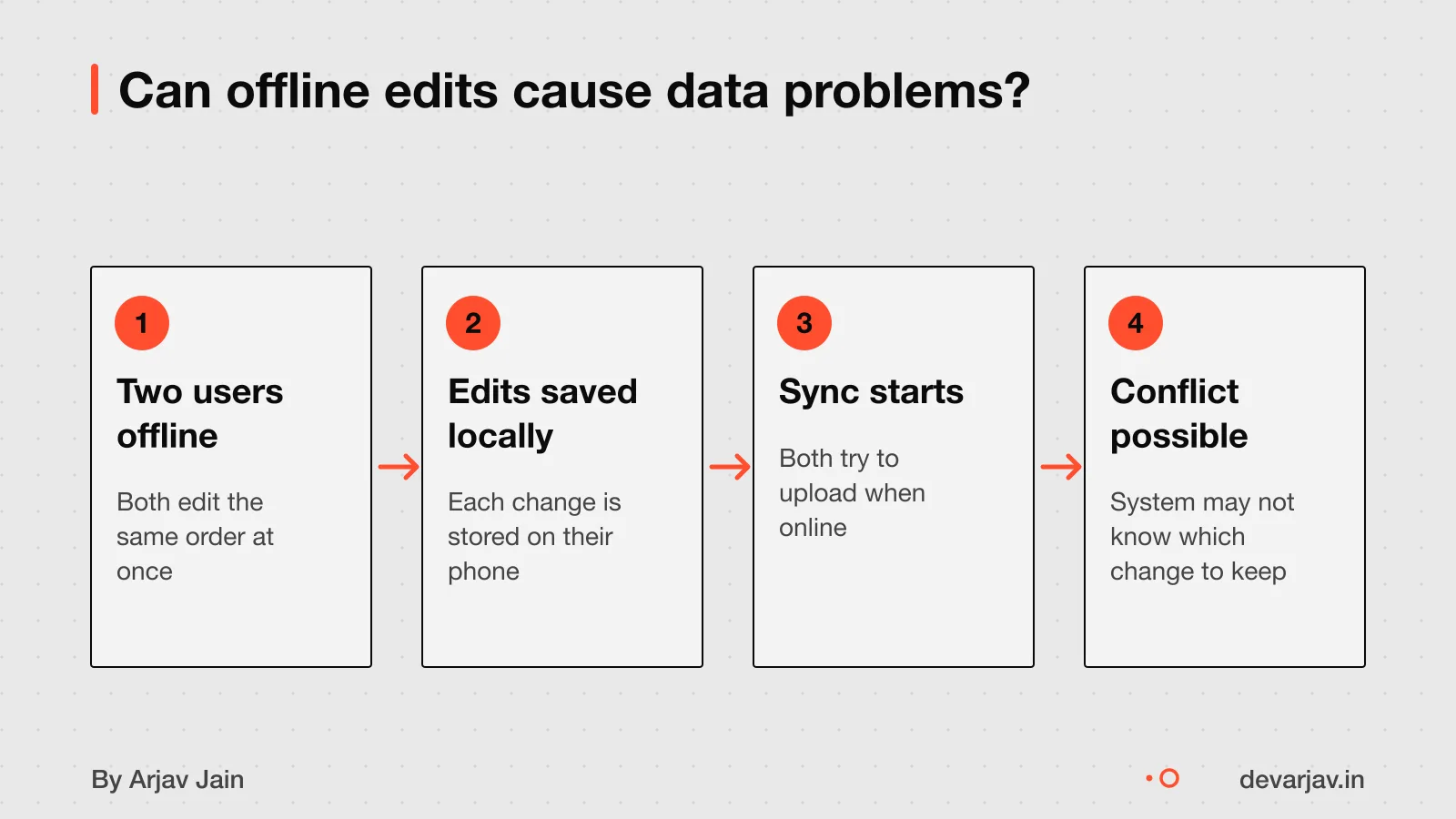
When two users edit the same data offline, conflicts can happen. For example, two staff changing a customer’s order at the same time may cause one update to be lost. This is hard to fix and needs careful design. You must plan for this if multiple users work offline.
Who owns the app and can you switch developers?
You should own the app’s code and accounts once it is paid for, if your contract says so. Your contract should state that all code, designs, and materials become your property after payment. This means you control the app, even if you later change developers.
Yes, you can switch developers later. But if you move from one app store programme to another, you will need a new bundle identifier. The same bundle identifier cannot be reused across different developer accounts.
If you switch, you do not lose the app’s data or features as long as you keep access to the source code and design files. But without a new bundle ID, you cannot update the app on stores under the same name. Always keep your code in a private GitHub or GitLab account that you own.
Can I get the source code of my app? explains how to verify ownership and safely store your files.
How to start working with a developer safely
Yes, sign an NDA early to protect your idea during first talks. Your contract must say you own the app’s code and design once you pay. Ask the developer about their pricing model, scope definition, and payment schedule. A clear schedule states when payments are due and what triggers them, like a completed feature.
Many apps fail to make a lasting impact, according to one analysis. An app that nobody opens is the most expensive way to find out you did not need one. This happens in nearly every project, so agree on a change process early.
Test the app fully before launch to catch bugs. Poor testing leads to crashes, lost data, or bad reviews. Apple offers code-level help for their tools and account help by phone or email.
Next step: message me on WhatsApp with what you want to build. No forms, no sales team.
Message me on WhatsAppAssumptions behind the numbers
- Moderate user growth and annual feature updates drive ongoing costs.
- Hosting, updates and app store fees are recurring expenses beyond initial build.
- Offline-first design is chosen upfront to avoid retrofitting costs.
What is in it, and what is not
One codebase for Android and iOS, built offline-first when your users cannot count on a signal, by the person you speak to.
- 01A written scope
Screens, features and integrations listed in plain language, with the things left for version two named.
- 02Design you can react to
Key screens and the main flow drawn before they are built, so you change your mind on paper, not in code.
- 03The app itself
Flutter for Android and iOS, with offline behaviour decided up front rather than patched in later.
- 04Testing builds every milestone
Something real on your phone at the end of each milestone, not a demo at the end.
- 05Store submission
Listings, builds and submission on Google Play and the App Store, under accounts you own.
- 06Handover
Source code in your repository, accounts and keys in your name, and a short document on how it fits together.
How it runs: milestones you can test
- 1Scope and flow
You can test: A written scope and the main user flow, agreed.
- 2Clickable core
You can test: The core journey working on your phone, with placeholder content.
- 3Feature complete
You can test: Every in-scope feature present and testable.
- 4Store ready
You can test: Release builds, listings and submission done; handover started.
Right for you if
- You have a clear user and one problem to solve first.
- You need Android and iOS together and want to keep cost sane.
- You want to talk to the person writing the code.
Look elsewhere if
- You need a large team across many specialisms at once.
- You need a game engine or heavy native hardware work.
- You want a fixed number on a one-line brief with no scope.
How it is priced
Price follows scope, not hours I happen to spend. You get a written scope first, then a price split across the milestones above, with a stated process for changes. A single lump sum on a vague brief is where projects go wrong.
Questions to ask before you sign, with anyone
- Who exactly will write my code?
- What is not included, written down?
- What can I test at the end of each milestone?
- Whose name are the store accounts and repository under?
- What happens if we stop halfway?
Quick answers
Why Flutter?
One codebase produces both Android and iOS apps, which cuts cost and keeps the two in step. It suits most business apps; it is not the answer to every problem.
Can the app work without internet?
Yes, if it is designed for it from the start. Offline behaviour is decided in the scope, because retrofitting it is expensive.
Do I own the code?
Yes. The repository and store accounts are set up in your name from the start.
Questions people ask
Should I build an app or a website first?
Start with a website if your customers mainly need to find you, check prices or message you. An app may make sense if users need offline use or phone features like GPS or camera. Consider a fast website and WhatsApp for now.
Can a Flutter app work offline?
A Flutter app can work offline if it uses phone features like local storage and sync, when built for it. It must store data locally and sync when the connection returns. Retrofitting offline support later is complex and costly.
How do I know if my app works without internet?
Ask your developer to show a demo where the app works without turning on mobile data or Wi-Fi. There is no standard test, so a live scenario is the best proof. Confirm it saves your entries and syncs later.
What happens when two users edit the same data offline?
If two users change the same data offline, the app may face a conflict when syncing. The app must have a rule to pick one version or merge them. Ask your developer how they plan to handle this.
How much more does offline support cost?
As an estimate, offline-first design adds 20 to 30% to development cost due to sync logic and testing. This assumes moderate data types and two-way sync. For a ₹20 lakh app, expect ₹4 to 6 lakh extra.
Do I own the app after it is built?
Yes, you should own the app if your contract says so. The source code, designs and app store accounts must be in your name after payment. Ask for a clause that confirms full ownership.
What legal rules must my app follow in India?
Your app may need to follow the DPDP Act for user data, GST rules for payments, and app store policies. These depend on your app’s function. Check this for your case with a chartered accountant or lawyer.
Can I build an app for under ₹10 lakh?
Most custom apps start around ₹15 lakh, so under ₹10 lakh may mean a simpler app. Consider an MVP or a no-code tool first. For complex needs, budget realistically.